
Own productA product we designed, built and run.
Popup Pal
From trader applications to tickets at the gate.
- What it is
- Event management for markets, fairs and exhibitions
- Our role
- Product, design, engineering and operations
- Status
- Live at popuppal.com
All project details
- Type
- A CodeHardy product
- What it is
- Event management for markets, fairs and exhibitions
- Our role
- Product, design, engineering and operations
- Platform and stack
- Next.js, TypeScript, PostgreSQL and Stripe Connect
- Status
- Live at popuppal.com
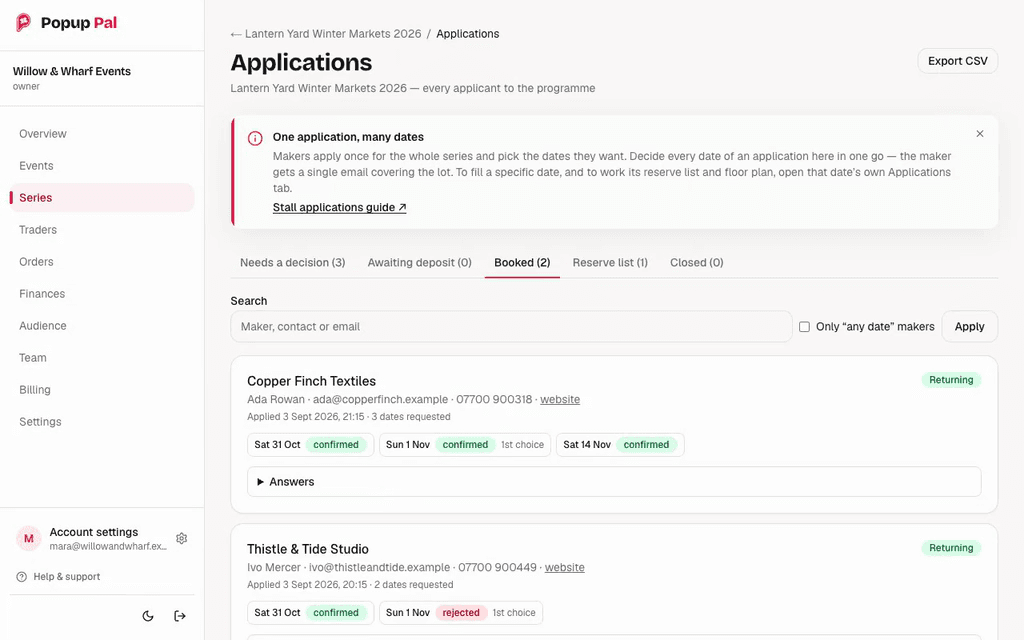
One application, many dates
A trader applies once for the whole series and picks the dates they want, instead of applying event by event.
Tabs by stage
The inbox is grouped into needs a decision, awaiting deposit, booked, reserve list and closed.
Every date gets its own outcome
Each requested date is confirmed or rejected separately. The second card shows one date confirmed and one rejected. The notice on screen says the trader gets a single email covering every date.
The brief
Running a market involves more than selling tickets. Organisers need to review traders, collect stall fees, keep track of insurance documents and decide who goes where on the day.
We built Popup Pal to bring those tasks together. An application can become a booking, a payment and an allocated pitch without the organiser copying the same details between separate tools. We own the product and take it through design, development, deployment and ongoing support.
Our contribution
CodeHardy’s role
- Product development and interface design.
- The web application, database and payment integration.
- Hosting, releases, monitoring and support.
Event organisers
- Event prices, trader selection and pitch allocation.
- Their customer relationships, refund policies and Stripe accounts.
The engineering challenges
Reliable payments and admissions
Payments can be reported more than once, and several phones can scan the same ticket at the same time. The application has to recognise those duplicates without issuing extra tickets or admitting someone twice. We built checks around payment settlement and ticket admission, backed by tests against a real PostgreSQL database.
One application, several event dates
A trader can apply for a whole series of markets at once. Each date still needs its own decision and pitch, while deposits, balance payments and messages must stay consistent across the booking. We modelled those steps together so organisers can manage the series without starting again for every date.
What we built
Trader applications and documents
Organisers create application forms, review traders and collect supporting documents in one inbox. Traders can save a draft, apply for several dates and receive reminders before their documents expire.
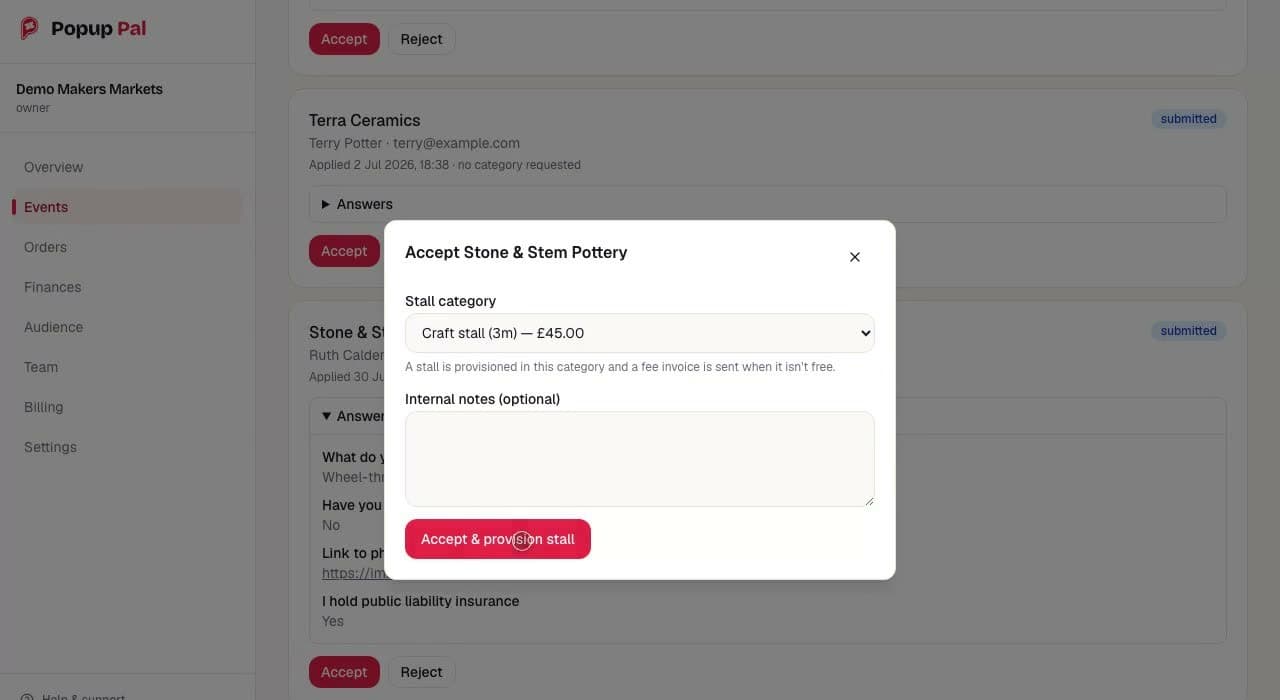
The decision sets the price
Accepting a trader means choosing a stall category, here a 3 metre craft stall at £45.00.
The invoice follows from the decision
The helper text says a stall is provisioned in this category and a fee invoice is sent when it is not free.
Answers stay with the application
The trader's answers to the organiser's own questions sit on the application card, including whether they hold public liability insurance.
Stall offers, invoices and payments
Accepting an application sets the stall and price. Deposits confirm bookings, balance invoices follow automatically, and reminders chase unpaid invoices. Card payments go directly to the organiser's Stripe account.
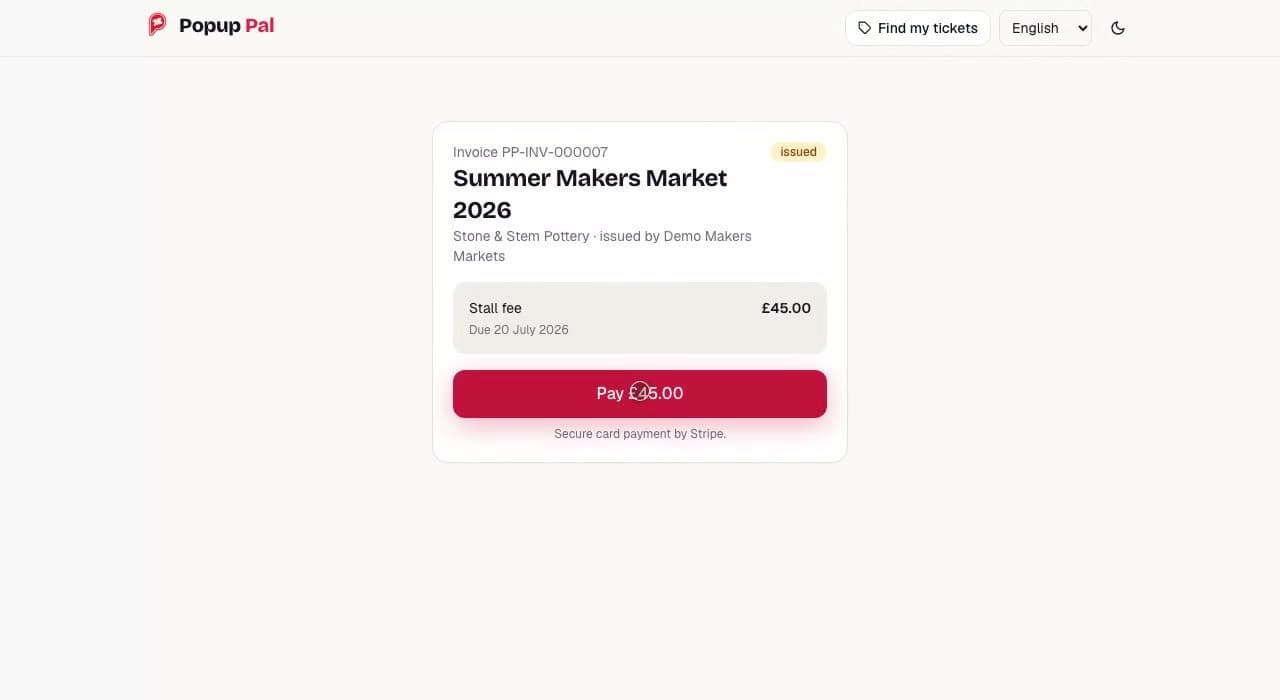
Pay directly from the invoice
Traders open their invoice and pay from a secure link, without a sign-in step.
Issued by the organiser
The invoice names the organiser as the issuer. The card payment is a direct charge on the organiser's connected Stripe account.
Card payment by Stripe
The page states that card payment is handled by Stripe. Popup Pal takes no percentage of stall fees.
Tickets without an account
Visitors buy tickets as guests and open them from an email link. Organisers control ticket types, capacities, sale windows and discounts. Buyers can retrieve their tickets or request a refund from the same order page.
Floor plans and show day
Organisers lay out pitches in a drag-and-drop editor and share the plan with their setup crew. On the day, staff use a phone browser for ticket scanning, door sales and trader check-in, with no dedicated app or scanner to install.
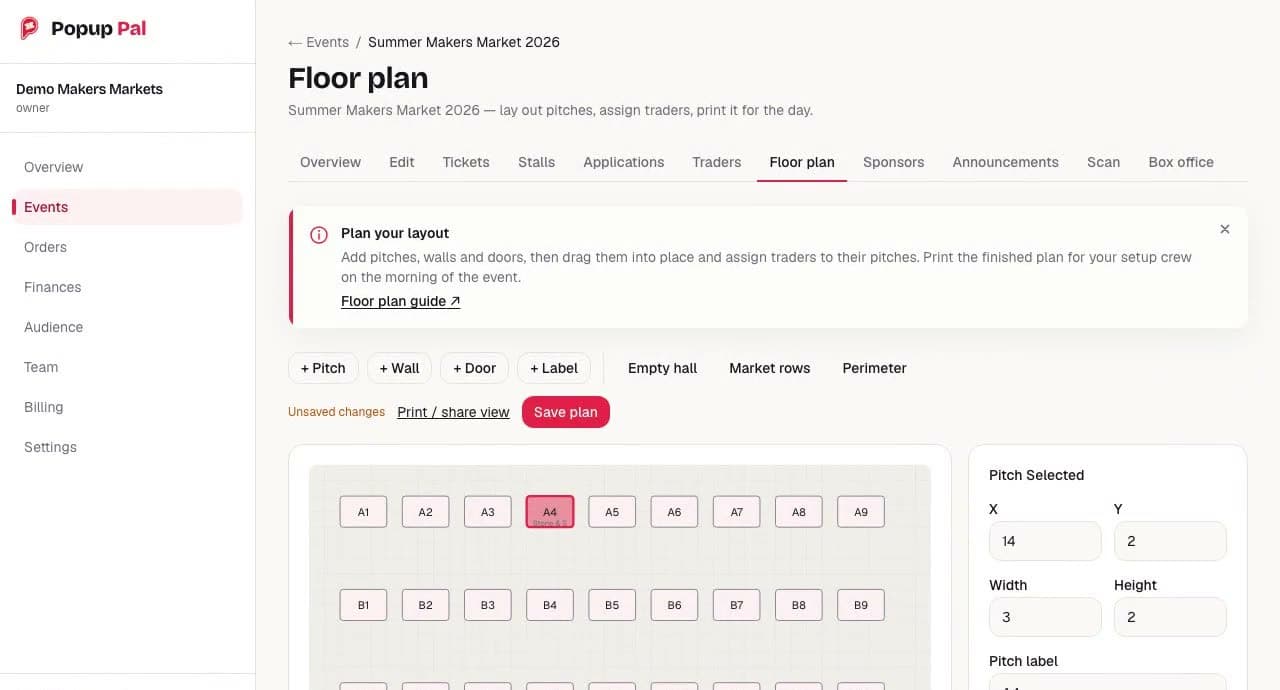
Tools and layout presets
Pitches, walls, doors and labels are added from the toolbar. Empty hall, Market rows and Perimeter give a starting layout.
Print and share view
The plan has a print and share view. The notice on screen says it is for the setup crew on the morning of the event. Unsaved changes are flagged next to the save button.
Traders are assigned to pitches
The selected pitch, A4, shows the start of the assigned trader's name under its label. Its position and size are edited in the panel on the right.
Scan in a phone browser
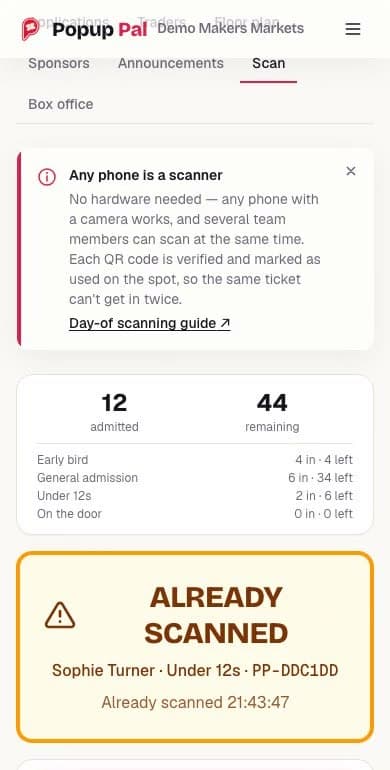
Scanning runs in the phone's browser. There is no app to install and no scanner to hire, and several staff can scan at the same time.
Counts by ticket type
Admitted and remaining totals are shown for the event and for each ticket type.
A second scan is refused
Staff see when a ticket has already been used, alongside its holder and ticket type.
Checked in, with a time
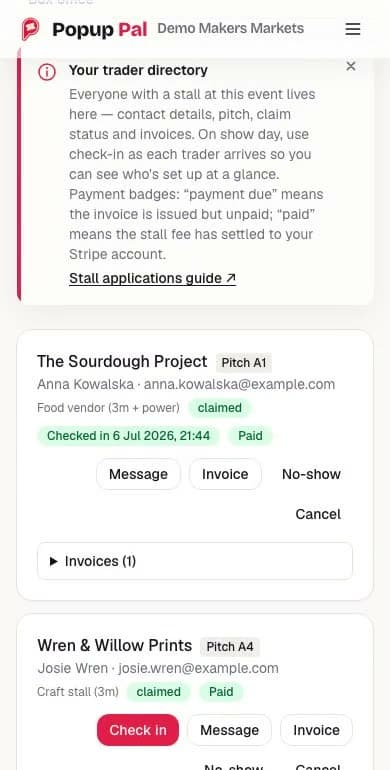
Each trader is checked in as they arrive, against the pitch they were given on the floor plan. A trader who does not arrive can be marked as a no-show.
Payment status on the same card
Staff can check whether a trader has paid while checking them in. Unpaid invoices remain visible on the same card.
Engineering decisions
Keep event payments with the organiser.
Why: Stripe Connect routes card payments directly to each organiser's account. Organisers remain the seller and keep control of their event income.
Trade-off: Payment handling must match every transaction to the correct organiser and safely handle repeated notifications from Stripe.
Check ticket admission on the server.
Why: A database transaction prevents two phones from admitting the same ticket at once and checks whether the ticket or event has been cancelled.
Trade-off: Staff need an internet connection at the gate. The scanner shows when a decision is still pending.
Protect the last ticket from simultaneous sales.
Why: Online checkout and door sales use the same reservation process. Database transactions control availability when several buyers try to book the last place.
Trade-off: Competing requests may need to retry. Integration tests cover simultaneous buyers and duplicate payment events.
Explore the project
Explore the product demo (opens in a new tab)
See applications, payments, floor planning and check-in using a sample event.
Visit Popup Pal (opens in a new tab)
The live product, its features and pricing.
The Retreat New Forest (opens in a new tab)
The organiser used Popup Pal for applications, invoices and visitor tickets at its Artisan Market and estimated it saved two days of work. Read its published customer story.
Have a project in mind?
Tell us what you need to build or improve. We reply within one working day.